


On the Transactions Reports page, you’ll find shortcuts to data you’re likely to need as you process payments for your event.
In this article:
- Where is it?
- How this list works
- Registrants with registration options
- Credit card refunds
- Discount code usage
- Transaction reports
Where is it?
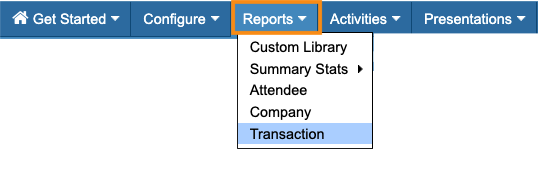
To visit this page, head to the Reports tab. Then choose Transaction:
How this list works
The Transaction Reports page is designed to be a handy link list, where you can quickly access reports from different areas of MeetMax:
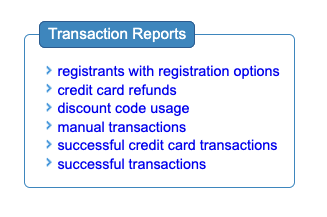
Depending on the report, when you click the link you’ll either:
- Download an Excel file, to open in your favorite spreadsheet software
- Be taken to a report page in MeetMax
Below, you’ll find a short description of each report.
Registrants with registration options
This report downloads as a spreadsheet. If your event is offering any Registration options, this report lists all registrants who’ve chosen any option.
You’ll also see each person’s base Registration type, and all costs associated with their options.
Credit card refunds
This report downloads as a spreadsheet. It contains the details of any credit card refunds you’ve processed, including transaction IDs and amounts.
Discount code usage
This report takes you to a report page in MeetMax. You’ll see how many times each of your discount codes has been used
Transaction reports
This group of reports downloads in spreadsheet form.
- Manual transactions: This report lists any check or money order transactions your team has posted. If you manually post credit card transactions, you’ll also see them here.
- Successful credit card transactions: This report lists all credit card transactions that have completed. It won’t include any incomplete transactions.
- Successful transactions: This is a broad report that includes all credit card, check, and money order transactions, plus all completed refunds.

