In your Admin view of MeetMax, you can access our AI-powered Virtual Support Agent on every page. Look for the icon in the bottom right corner:

Here are some important things to know about this feature.
How it's trained
The Virtual Support Agent is trained to reference only two websites:
Who can see it
Only your Admin team has access to this tool, regardless of their user roles.
Your event’s registrants don’t have access.
What it can’t see
The Virtual Support Agent is designed to answer general questions about using MeetMax.
It has no access to:
- Your event or account data
- Any data relating to your event registrants
Because of this, the Virtual Agent can’t answer questions about your specific account or events.
| We’re currently exploring AI options that could perform simple, event-specific tasks. If you have ideas for how this kind of tool could help you, please reach out to our Support team. |
Can you opt out?
If you'd rather not have the Virtual Agent present in your events, reach out to our Support team. We can disable it in all of your events.
Would you rather reach a human?
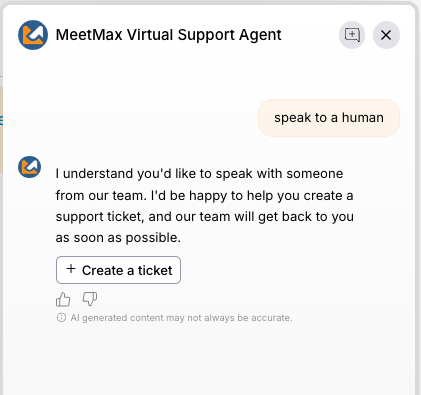
If the Virtual Agent can’t answer your question, it will recommend that you contact our Support Team. It will give you a handy form to create a ticket.
At any time during a chat, you can also type in “speak to a human,” and get the same ticket form. Our Support team will respond within our standard response time: