


Importing presentations: How do I combine my Date and Time columns?

To import presentations into MeetMax, your CSV must contain these two columns:
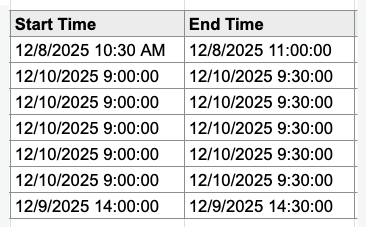
Notice that both of these columns contain both the date and time.
All popular spreadsheet applications have a default Date/Time cell format that works well.
Combining separate columns
If your spreadsheet has separate columns for the date and time, you can use a formula to combine them into one column for importing.
| We’ll show these steps in Google Sheets, but they’ll be the same in any spreadsheet software. |
- Step 1. Add two new columns to your spreadsheet - one for the starting date/time, and one for the ending date/time.
- Step 2. Change these new columns to your spreadsheet software’s standard Date-and-Time cell format:

- Step 3. Let’s combine the start date and time first. In the first cell of your new Start Time column, add a formula that references the Date column + the Time column:
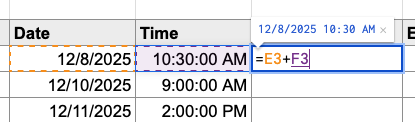
- When you save this formula and replicate it in the rest of the column, you’ll see all the combined start dates and times:
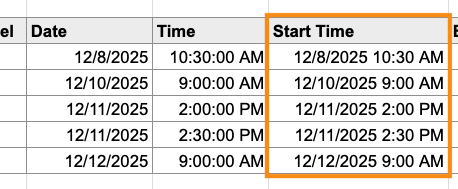
- Step 4. Repeat these steps to populate your new End Time column:

-
Don’t delete the original, separate columns! The formulas you’ve just built are dependent on them. If you delete the original columns, the new ones will break. (Don’t worry, we’ll deal with the original columns in a moment.) To make the next steps simpler, we recommend changing your original (separate) column titles as needed, so it’s clear which ones are the new Start Time and End Time columns. - Step 5. Export your spreadsheet as a CSV file. Then start importing the presentations to MeetMax.
- Step 6. When you reach the mapping step of the import, mark the original columns you don’t need as Do not map this field:
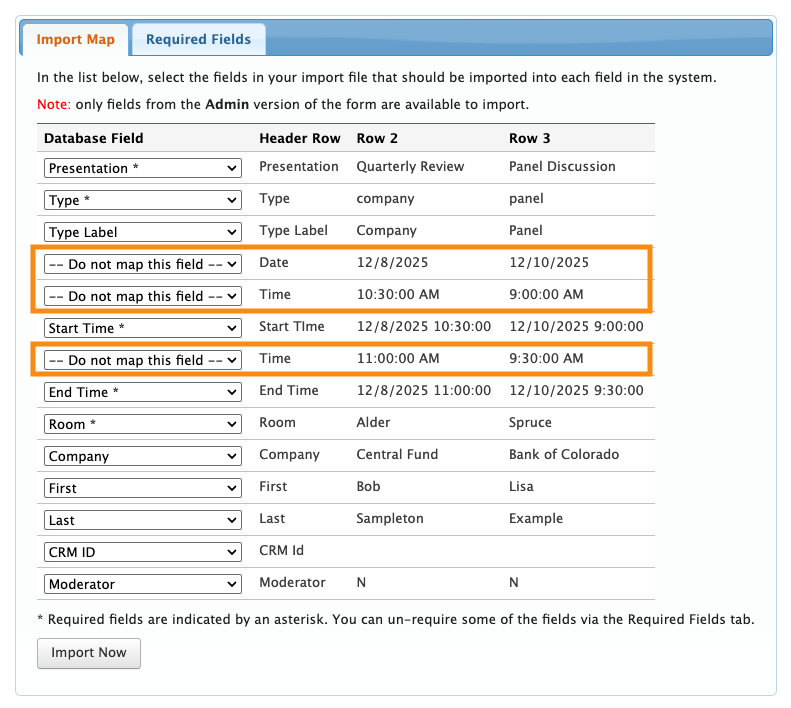
- MeetMax will now reference only your new, combined date/time fields.
-
Your spreadsheet software may convert times into 24-hour format, so that 2:00 PM reads as 14:00. MeetMax always uses the time setting you specified in your event’s Main Details.
If your event is using 12-hour time, MeetMax will automatically convert a 14:00 back to 2:00 PM.

