


If you're trying to find a specific Attendee, Company Rep, or Company on any MeetMax list page, there are several possible reasons they aren't currently showing up.
Here are some things to check.
In this article:
- Is there naming confusion?
- Are filters interfering?
- Does your Custom List have display settings?
- Does the participant need to finish paying?
Is there naming confusion?
As an Admin, you'll see your event’s registered participants on the Attendee List or Company List.
However, our team might have added custom names to some user roles for your event.
If you’re looking for a particular user, here’s how to match up custom role names:
- Shown on the Attendee List: Attendee, Investor, Delegate
- Shown on the Company List: Company, Sponsor, Bank, Entity, Corporate
Are filters interfering?
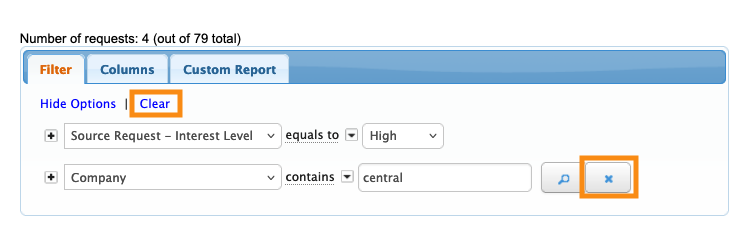
If you’re working in your Admin view of the Attendee List or Company list, check your current filters.
You might have a filter in place that’s excluding the participant you’re looking for.
To remove filters:
- Click the X to delete a single filter.
- Click Clear to delete all filters.
| If you’re not sure if there’s an interfering filter in place, our Support team is happy to help. |
Does your Custom List have display settings?
For some events, you might have a Custom List page that participants can see. It lists Attendees or Companies.
Your Custom List might have display settings that are hiding the participant you need. If you’re using some custom form fields to organize your event’s participants into categories, for example, you can then choose which category to display on your list:
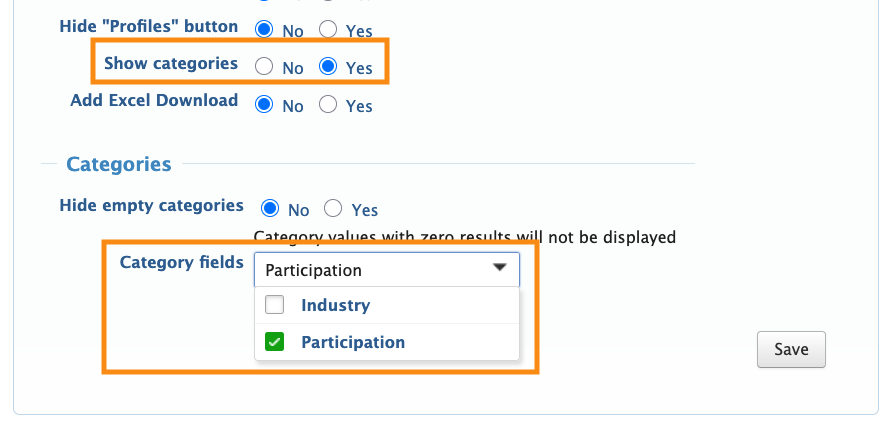
To see a particular participant, you might need to move them to a different group. You’d do this by updating the Admin version of their registration form.
| If you’re not sure which display setting might be affecting your Custom List, our Support team will be glad to help. |
Does the participant need to finish paying?
If you’re using MeetMax to process registration payments, participants will only appear on the main Attendee List or Company List once they’ve completed payment.
Before completing payment, they display on the Pending Registration list:



