How does my team get notified of new registrations?

You can configure email alerts to your team’s needs.
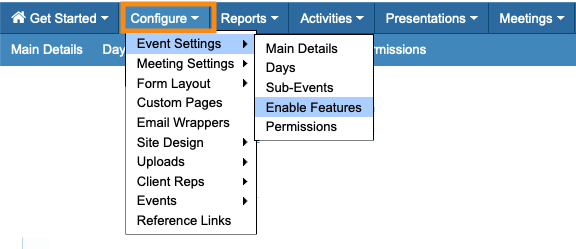
- Step 1. Head to the Configure tab. Choose Event Settings, then Enable Features:
- Step 2. Scroll to the Notifications section.
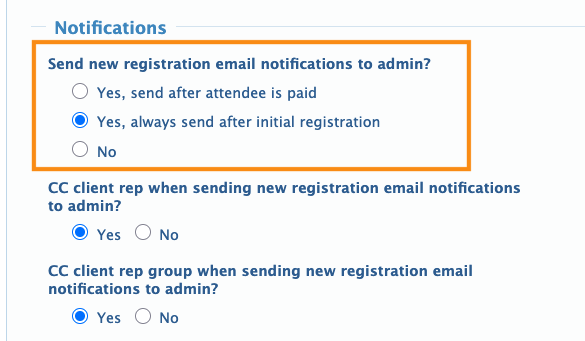
- Choose how event Admins receive notifications:
- • After a registrant pays their invoice through MeetMax
- • Once a registrant has completed the registration form
- • No notifications
- If your event isn’t using paid registration, choose the second option, as shown below:
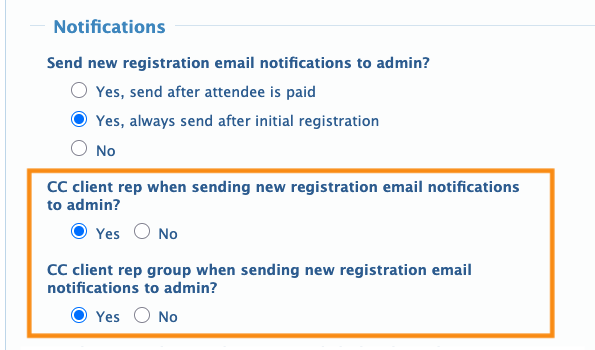
- Step 3. The next two settings are optional:
- • If your event is assigning specific Attendees to members of your team, choose the CC Client Rep option.
- • If your event has Client Reps organized into groups, like sales territories, choose the CC Client Rep Group option:
- Step 4. Scroll to the bottom of the page and click Save:
Settings for registration approvals
If your event is using registration approvals, by default MeetMax sends Admins a notification with each approval.
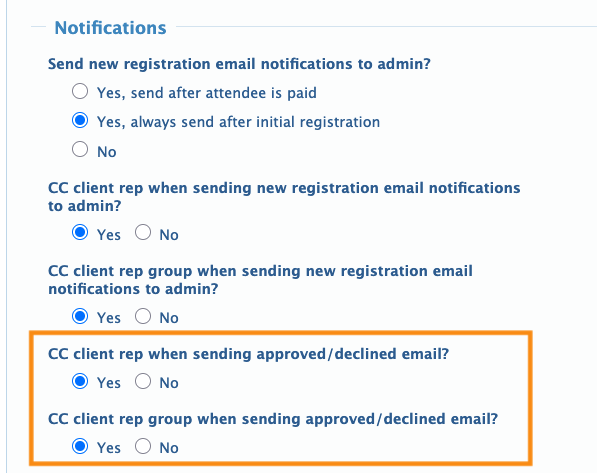
If you want to cc these emails to Client Reps or Client Rep Groups, you’ll find these settings below the ones we covered above: